

You log into your business bank account to run payroll, approve a vendor payment, or check whether receivables landed on time. The screen looks normal. The balance is right. Nothing appears wrong. Still, there’s often a brief pause before you click.
That hesitation is reasonable. Online banking is convenient, fast, and integral to how small businesses operate. It also sits at the center of cash flow, payroll, tax payments, and financing activity. If anything goes wrong, the impact isn’t abstract. It’s operational.
That concern is widely shared. According to a 2024 Dados Insights survey, 72% of U.S. consumers expressed apprehension about the safety of their online accounts (Dados Insights digital banking security findings). For a business owner, the question is even sharper because the risk isn’t only about your own login habits. It also includes staff access, payment approval controls, connected apps, and what happens if fraud is technically “authorized.”
Table of Contents
- The Lingering Question in Your Digital Back Office
- Inside the Bank’s Digital Fortress
- Common Threats Targeting Your Business Account
- Liability Gaps and the FDIC Insurance Misconception
- Your Actionable Business Banking Security Checklist
- Conclusion Banking with Confidence Not Complacency
- Frequently Asked Security Questions
The Lingering Question in Your Digital Back Office
A lot of owners ask how secure is online banking as if there should be a yes-or-no answer. There isn’t. Online banking can be highly secure, but only when two things work together: the bank’s security stack and your operating discipline.

A typical failure doesn’t start with a criminal “breaking the bank.” It starts with something ordinary. An office manager reuses a password. A controller approves a payment from the wrong device. A staff member clicks a link in a fake vendor email. The bank may still be secure. Your process wasn’t.
Security is a shared-control system
Banks handle the core infrastructure. You control access, devices, approval flows, and staff behavior. That’s why two businesses using the same bank can face very different outcomes.
If your company operates in a local market with a distributed team or hybrid access, external support can help tighten the gaps around the account itself. Resources on Cybersecurity for Orlando businesses are useful because they focus on the practical layer many owners miss: endpoint protection, staff behavior, and business process security around financial systems.
Practical rule: Treat online banking like your physical office alarm system. The bank installs the vault. You still have to control who gets keys, who enters the building, and who can approve a wire.
The right question is not just “Is it safe”
The better question is this: How secure is online banking for a business with multiple people, multiple devices, and recurring money movement?
That version gets you closer to reality. For a solo operator with strict habits, risk is lower. For a growing company with shared duties, connected accounting tools, and frequent outbound payments, risk expands through people and process.
Good security work doesn’t eliminate risk. It narrows the openings attackers and careless insiders can use.
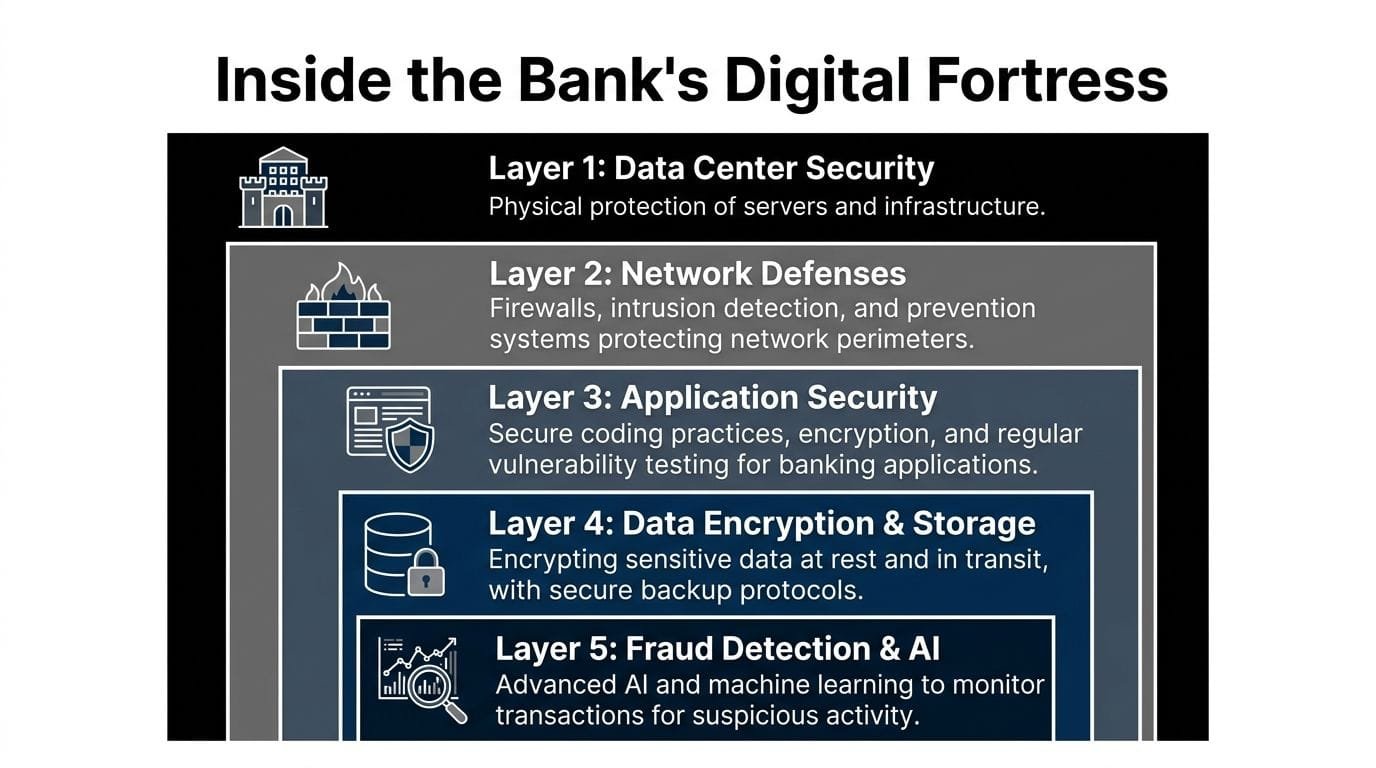
Inside the Bank’s Digital Fortress
The strongest online banking platforms work like layered vaults, not a single lock. If one control fails, another is supposed to contain the damage. That layered design is why online banking is often safer than people assume, provided the institution maintains the stack and the user doesn’t bypass it.
What the encryption layer actually does
Modern digital banking relies on AES-256 for stored data and TLS 1.3 for data in transit (mobile retail banking security overview). In plain terms, that means your data should be protected while it moves between your device and the bank, and while it sits in the bank’s systems.
Here’s the practical translation:
| Layer | What it protects | Why it matters to a business owner |
|---|---|---|
| TLS 1.3 | Data moving between your browser or app and the bank | It reduces the chance that someone can intercept login or transaction data in transit |
| AES-256 | Stored account and transaction data | It helps protect records if systems are exposed or accessed improperly |
AES-256 matters because it makes brute-force decryption computationally infeasible with current technology, according to the Zimperium reference above. That doesn’t mean “unbreakable.” It means properly encrypted data is much harder to turn into usable information.
Why visible policy details matter
Not every bank explains its controls with the same level of detail. Research from California State University found that 85% of banks explicitly mention encryption for data transmission, while about 15% address encryption for data storage in public security policies.
That gap matters more than most owners realize. Transmission security is standard. Storage security visibility is uneven. If a bank says it encrypts data moving across the network but says little about data at rest, you don’t have a complete picture of how it handles a deeper compromise.
When a bank is vague about controls that matter, treat that as an information gap, not as reassurance.
For owners evaluating where to hold operating cash, borrow, or connect fintech tools, this is part of basic due diligence. A useful companion read on broader risk framing is navigating financial data security threats, especially if your finance stack now extends beyond one bank login.
The controls around the vault
Encryption is the foundation, not the whole building. Strong banking platforms usually combine it with practical safeguards such as:
-
Login friction where it counts
Multi-factor authentication makes a stolen password less useful. It’s one of the few controls that regularly stops low-effort account takeover attempts. -
Session and device checks
Banks often evaluate whether the login pattern looks normal. A sign-in from an unfamiliar device, strange location, or unusual timing may trigger step-up verification or a hold. -
Transaction monitoring
The bank doesn’t only care who logged in. It also watches what the account does. A payment that breaks your usual pattern can trigger scrutiny even after a valid login. -
Perimeter and application defenses
Firewalls, intrusion detection, secure code review, and vulnerability testing are part of the less visible side of banking security. You don’t see them, but they matter.
If you’re comparing institutions with newer digital platforms against legacy banks, don’t assume old means safer or new means riskier. Evaluate what the bank discloses, what controls it offers in the dashboard, and whether the user side is built for real business governance. A related perspective on digital finance trade-offs appears in this comparison of fintech vs banks and faster approvals in today’s market.
Common Threats Targeting Your Business Account
A small business banking loss often starts with an ordinary workday. Your office manager gets an email that looks like it came from a supplier. The message says the bank details changed, the invoice is due today, and the owner is copied. Nothing looks obviously wrong. The payment goes out, and by the time anyone checks the request by phone, the money is gone.
How attackers usually get in
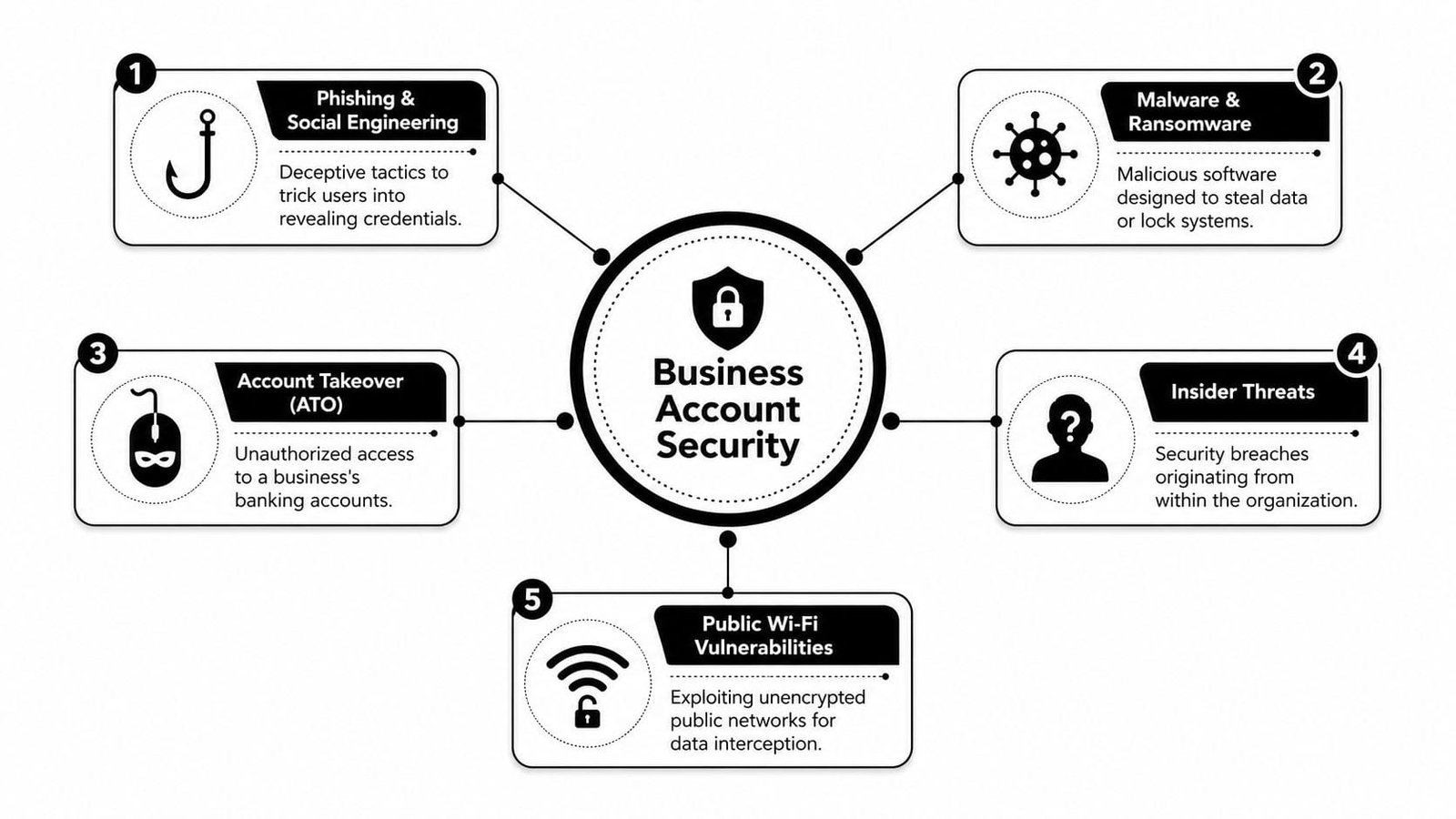
For business accounts, the first break-in is often social, not technical. Criminals target the approval process around the account because it is usually easier to fool a person than to bypass bank-side controls.
The common paths are familiar. Fake vendor updates. Spoofed messages from executives. Payroll emails asking for account changes. Bank alerts that send staff to a copycat login page. Later, attackers may use stolen credentials, infected devices, or browser compromise, but the opening move is usually a believable request tied to urgency.
That matters because small businesses often run lean. One employee may handle receivables, vendor setup, and payment initiation. One rushed click can turn a routine task into wire fraud.
Here’s a practical explainer before going further:
What insider risk looks like in practice
Internal risk deserves more attention than it gets in generic online banking advice. In small companies, the problem is often weak access design rather than a malicious employee.
I see the same patterns repeatedly:
-
One person controls the whole payment flow
The same employee can add a payee, enter the transfer, and approve it. -
Shared logins
Bookkeeping gets done faster, but the audit trail becomes useless and disputes get harder. -
Old access never removed
Former staff, outside accountants, or contractors keep account visibility or approval rights after their work changes. -
Valid access gets hijacked
An employee enters credentials into a fake portal, and the criminal logs in through a real account with real permissions. -
Too much trust in email instructions
Staff assume a message is legitimate because it references an actual project, invoice, or executive name.
The business risk is straightforward. If your company cannot show who approved what, who changed vendor details, and whether a second person reviewed the action, you have a security problem and a control problem. That affects fraud prevention, recovery, and cash flow planning. It also reinforces why a bank account alone is not a full small business financial strategy.
The weak point in many business banking setups is not encryption. It is loose control over who can move money, change payees, and approve exceptions.
A fast way to pressure-test suspicious email
If a message can change where money goes, verify the sender before anyone acts. Display names are easy to fake. Domains can be spoofed or imitated with small spelling changes. Replying to the same email thread is not verification.
Train your finance staff to inspect the sender details and message path. KeepKnown’s email header guide is a good reference for learning how to check where a message came from.
Use a simple process your team can follow under pressure:
- Never change payment details based only on email.
- Call a known contact using a number already stored in your records.
- Require a second approver for new payees, changed bank instructions, and unusual transfers.
- Review user access at set intervals, especially after staffing or vendor changes.
That adds a little friction. For business banking, that friction is often what stops the loss.
Liability Gaps and the FDIC Insurance Misconception
Many business owners feel safer than they should because they assume FDIC insurance will make them whole after online fraud. That assumption causes real damage.
What FDIC insurance actually covers
FDIC insurance protects against bank failure, not against every kind of theft tied to online access. That distinction matters. If someone tricks your company into sending money, or logs in through compromised credentials and initiates activity that the bank classifies as authorized or procedurally valid, FDIC insurance isn’t the backstop many people think it is.
NerdWallet’s explanation of online banking security addresses this directly and notes that business account holders lost over $1.2 billion due to authorized push payment fraud in recent years, where FDIC insurance did not apply (NerdWallet on FDIC limits and online banking fraud).
Why business accounts face a harder fraud outcome
Consumer accounts and business accounts don’t always land in the same place after a dispute. Business owners typically carry more responsibility for following account security procedures and maintaining reasonable internal controls.
That has practical consequences. If your company ignored available safeguards, used weak access practices, shared credentials, or approved a fraudulent transfer after being manipulated, recovery can get difficult fast.
A short comparison helps clarify the issue:
| Scenario | Is FDIC insurance the likely answer | What usually matters instead |
|---|---|---|
| Bank fails | Yes, that's the intended protection | Whether the institution and account are covered under FDIC rules |
| Credentials are stolen and funds move | Not automatically | Your bank agreement, your security practices, and how the transaction is classified |
| Employee is tricked into sending funds | Usually not | Approval controls, verification procedures, and whether the payment was treated as authorized |
This is why banking security can’t be separated from operational discipline. The legal and financial outcome often turns on whether your business followed the controls available to it.
If you’re reviewing your broader financial setup, including whether one bank account is carrying too much operational risk, this guide on why a bank account isn’t enough and smart financing moves every small business needs to make adds useful context around diversification and financial structure.
Don’t use FDIC insurance as a mental shortcut for “fraud protection.” For business banking, those are different questions.
Your Actionable Business Banking Security Checklist
Good banking security looks ordinary from the outside. It shows up in user permissions, approval paths, device hygiene, and recurring reviews. That routine work prevents the losses that hurt small businesses most.
Small business owners often focus on hackers first. Fair enough. In practice, I see just as many problems start with internal access that was too broad, shared logins that blurred accountability, or approval settings that let one person do too much alone. If your bank offers multi-user roles, transaction limits, and dual approvals, set them up early and review them often.
Start with access control
Begin with a simple question: who can view balances, who can create payments, and who can release money?
-
Separate duties
One person should not add a vendor, set up payment details, initiate a transfer, and approve it. Split those steps across roles. -
Use named user accounts only
Every user needs an individual login. Shared credentials make investigations harder and make misuse easier to hide. -
Match permissions to the job
A bookkeeper may need statements and reporting. That does not mean they need wire authority or user-management rights. -
Remove stale access quickly
Role changes, employee departures, outside accounting firms, and temporary staff create permission drift. Clean that up as part of offboarding and quarterly review.
Internal misuse is uncomfortable to discuss, but it belongs on the checklist. A trusted employee with too much access can cause as much damage as a stolen password.
Secure the devices and approval workflow
Your bank can secure its systems. It cannot secure a laptop full of malware or a phone used to approve wires over airport Wi-Fi.
Use this checklist:
-
Require MFA for every user
Include owners, executives, and anyone in finance. -
Use a dedicated device for banking if you can
A computer reserved for finance work has fewer chances to pick up browser junk, fake extensions, or malware from daily use. -
Install updates promptly
Operating system, browser, security software, and banking app updates close known weaknesses. -
Turn on alerts for logins, new payees, password changes, and payment activity
Speed matters. The faster you spot unusual activity, the better your chances of stopping or containing it. -
Ban public Wi-Fi for banking tasks
Staff who need remote access should use a trusted private network or cellular data. -
Verify payment changes outside email
If a vendor sends new wire instructions, confirm them using a known phone number, not the number in the message.
Owner habit that pays off: Review user access, payment limits, and alert settings on a calendar. Do not wait for a scare.
Audit connected tools like they have account access, because they do
Accounting platforms, expense software, payment processors, and cash flow tools can save time. They also expand the number of systems that can touch bank data or trigger money movement.
Before connecting any new tool, ask:
- What permissions does it request
- Who inside the company can approve that connection
- Can access be revoked cleanly
- Does it support user roles and activity logs
- Will it alert you to account changes or failed connections
If you are reviewing the wider finance stack around your bank account, this guide to small business essential tech tools is a useful way to identify which systems deserve tighter oversight.
Here is the short list I recommend owners and finance leads implement first:
| Priority | What to implement | Why it works |
|---|---|---|
| High | Dual approval for payments | Prevents one compromised or careless user from moving money alone |
| High | Role-based permissions | Limits what an employee or intruder can do after login |
| High | Named accounts with MFA | Improves accountability and blocks easy credential abuse |
| Medium | Dedicated banking device | Reduces exposure from routine web use and email |
| Medium | Callback verification for vendor payment changes | Catches business email compromise before funds go out |
| Medium | Quarterly access review | Finds old permissions before they become a fraud path |
Small business banking security is not a product you buy once. It is an operating discipline. Set the controls, assign ownership, and revisit them before someone tests them for you.
Conclusion Banking with Confidence Not Complacency
So, how secure is online banking for a small business?
Secure enough to run serious operations on it every day. Not secure enough to run on autopilot.
Banks have built strong technical defenses. Encryption, monitored transactions, layered authentication, and hardened infrastructure make modern online banking far safer than the average owner assumes. But the most expensive failures usually happen outside the vault. They happen in inboxes, on employee devices, inside sloppy approval chains, and through outdated assumptions about who bears the loss.
That's why business banking security is operational security. If your team can't distinguish a fake payment request from a real one, if old users keep access after role changes, or if one person can move money without oversight, the weakness isn't “online banking.” The weakness is the business process around it.
The good news is that these risks are manageable. Strong permissions, dual approvals, named accounts, MFA, secure devices, and disciplined verification routines prevent a lot of the incidents that hurt companies.
Confidence is the right goal. Complacency isn't.
A well-run business should be able to bank online, move funds, manage cash, and connect financial tools without constant fear. But that confidence has to be earned through controls. When the bank does its part and you do yours, online banking becomes what it should be: efficient, scalable, and dependable.
Frequently Asked Security Questions
Is public Wi-Fi ever safe for online banking
As a business rule, no. Don't bank over public Wi-Fi. Even if the login page is encrypted, public networks create unnecessary exposure around session handling, spoofed access points, and device compromise. If you must access the account while away from the office, use mobile data or a trusted private connection.
Is a bank app safer than a fintech app connected to my account
Not automatically. A bank's own app usually gives you the shortest chain between your device and the institution holding the funds. A fintech app can still be secure, but you need to vet its permissions, user controls, access revocation, and account monitoring features. Treat every connected app as part of your financial perimeter.
What should I do first if I think my account was compromised
Act fast and in order.
- Contact the bank immediately and report suspected compromise or unauthorized activity.
- Lock down access by changing credentials and reviewing active users, devices, and connected tools.
- Freeze money movement where possible by pausing approvals, reviewing recent transactions, and validating any pending payment instructions through known contacts.
Then document everything internally. Save suspicious emails, note the timeline, and identify which user account or device may have been involved. Speed matters, but clean records matter too.
If your business is evaluating funding options, connected financial tools, or an efficient way to manage capital access, Business Loan Warrior offers a secure, fintech-enabled platform built for small businesses that need speed without losing visibility and control. You can explore financing options, compare solutions, and review resources designed to help you make smarter financial decisions while keeping operational discipline front and center.